
You exported 1,000 prospects from LinkedIn this morning. Your data vendor came back with 580 verified work emails and 290 mobile numbers. The rest — 420 contacts your SDRs need to call today — are blank. You know these people exist. Half of them have posted on LinkedIn this week. Your vendor just doesn't have their contact details.
That gap is the entire reason waterfall enrichment exists. And in 2026, for email and mobile data specifically, it's becoming the difference between a sequencing tool that fills the calendar and one that fills the bounce queue.
This guide is the operator's version. Not a definition you can get from any other article on the SERP. We've benchmarked the math, mapped the failure modes most platforms don't admit to, walked through how high-performing teams score and rotate their vendor stack monthly, and shown what a DIY waterfall actually costs to run when you're sourcing from 10 or 20 vendors directly.
What's in this guide
- Waterfall enrichment for contact data, defined honestly
- The math: why single-source caps out at 60%
- Email enrichment vs mobile enrichment — different problems
- How a contact data waterfall actually works
- Vendor order matters more than vendor count
- The monthly scoring system: how to rank and rotate vendors
- How many vendors should you actually use?
- The failure modes nobody talks about
- The real cost of a DIY waterfall (the part nobody publishes)
- The managed alternative: when running it yourself stops making sense
- Frequently asked questions
1. Waterfall enrichment for contact data, defined honestly
Waterfall enrichment is a data architecture where a contact record — a name, a company, a LinkedIn URL — is routed through multiple B2B data vendors in a defined priority order, stopping as soon as a verified email or mobile number is returned. If the first vendor returns nothing, or returns a result below the confidence threshold, the record cascades to the second vendor, then the third, until either a verified match is found or the waterfall is exhausted.
That's the textbook definition. Here's the honest one: waterfall enrichment is a workaround for the fact that no B2B database in the world has complete coverage of working emails and current mobile numbers. ZoomInfo is strong on North American business emails. Cognism is strong on European mobile dials. Apollo is broad but inconsistent on phones. Hunter is excellent for domain-pattern emails but doesn't sell phones at all. Lusha leans on contributory LinkedIn data. Every single vendor has structural blind spots — geographic, vertical, seniority-level, or freshness-related. A waterfall stitches their strengths together.
For implementation, see the reverse email lookup API and its supported inputs.
For contact data specifically — emails and mobiles — the case for waterfall is sharper than for any other data type. Two reasons:
- Contact data decays fastest. Roughly 30% of B2B contacts go stale every year. Mobiles decay faster than emails. A vendor that was 85% accurate last quarter may be 72% accurate this quarter — and you have no way to know which contacts went bad until your bounce rate tells you.
- Bounces have compounding consequences. A bad firmographic field is annoying. A bad email burns your sender domain reputation. A bad mobile triggers carrier-level spam flags. The cost of low quality is not linear — it cascades downstream into every campaign you run for the next 90 days.
If you've been pitched waterfall enrichment as a sophisticated AI methodology, ignore that framing. It's plumbing. Good plumbing, plumbing that meaningfully changes pipeline outcomes — but plumbing.
Adjacent terms you'll see
Cascade enrichment — same thing, different name. Multi-source enrichment — broader umbrella that includes both sequential cascades and parallel queries. Coverage stacking — informal industry slang. Real-time enrichment — describes when enrichment runs (on lookup vs scheduled batch), which is a separate dimension from the waterfall architecture itself.
2. The math: why single-source caps out at 60%
This is the section most articles handwave through. We're going to show the math, because the math is the entire argument for waterfall enrichment.
Industry benchmarks across published studies — Cognism, Cleanlist, Unify, Persana, Findymail, and several public deliverability tests — converge on a consistent range for contact data:
- Single-vendor email match rate: 40–65% on a typical mixed-geography B2B list
- Single-vendor mobile match rate: 30–55%
- Annual contact decay: ~30% (Gartner; Marketing Sherpa; corroborated by Cognism's published refresh data)
The 40–65% ceiling isn't because vendors are lazy. It's structural. Every B2B contact database is built from a specific combination of sources — contributory networks (users uploading their address books), public web scraping, licensed data partnerships, ML-inferred email patterns, and human-verified phone outreach. Each sourcing method has natural coverage gaps. A US-focused contributory network sees ten times more North American contacts than European ones. A LinkedIn-scraping engine misses anyone with a private profile. An email-pattern engine can guess at addresses but can't tell you which are valid without verification.
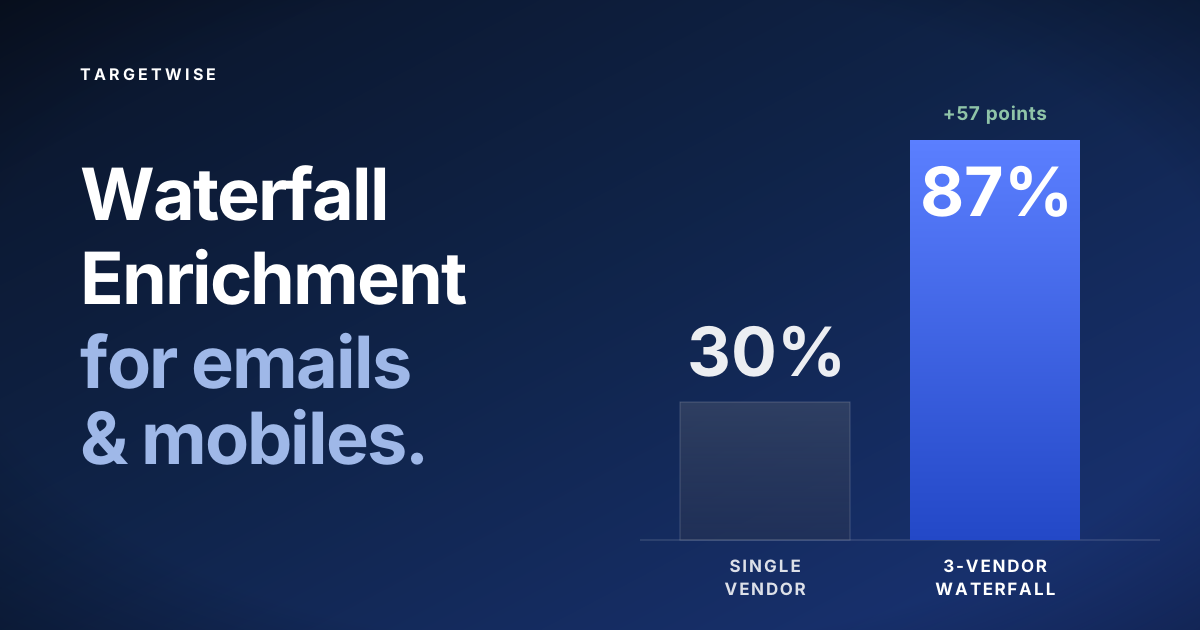
Here's what a single-vendor vs three-vendor waterfall looks like on the same 1,000-contact list, using mid-range benchmarks:
The numbers vary by list. A US-only enterprise list will hit higher single-vendor rates because every major vendor over-indexes on US enterprise. A European SMB list will fall further — single source on European SMBs commonly drops to 35–45% match rates. The lift from waterfall is bigger when the list is harder.
The math works because vendor databases overlap less than people assume. The intuitive (wrong) assumption is that if Vendor A has 70% coverage and Vendor B has 70%, the overlap means Vendor B only adds 5–10 percentage points. In practice, the overlap on the records Vendor A missed is much higher than the overlap on the full universe — because the contacts A missed are often missed for structural reasons (wrong geography, wrong vertical, recently changed jobs, junior seniority) that Vendor B's different sourcing methodology can fix.
Cost-per-usable-record, not cost-per-lookup
The right metric isn't cost-per-lookup. It's cost per verified, usable record. A $0.10 lookup that returns nothing 40% of the time has an effective cost of $0.17 per usable record. A waterfall that costs $0.25 per lookup but returns 87% of the time has an effective cost of $0.29 per usable record. The headline price is higher, the usable-record price is barely different, and the reachable pipeline is 40% larger.
This is why higher-ACV teams almost always win with waterfall. If you're closing $30K deals, an extra 250 reachable contacts per 1,000 list could be worth one to three new opportunities. The math is decisive. If you're closing $500 deals at high volume, the same logic doesn't apply — we'll come back to this.
3. Email enrichment vs mobile enrichment — different problems
Most articles lump emails and mobiles together as "contact data." For operators building a waterfall, they need different cascades, different vendors, and different verification logic.
| Email enrichment | Mobile enrichment | |
|---|---|---|
| Single-vendor match rate (typical) | 40–65% | 30–55% |
| Primary sourcing method | Pattern inference + verification | Contributory networks, human verification |
| Verification method | SMTP ping, MX check, catch-all detection | HLR lookup, carrier validation, DNC check |
| Decay rate (annual) | ~25–30% | ~30–40% |
| Cost of bad data | Sender reputation, bounce rate, deliverability | Wasted dial time, carrier spam flags, DNC fines |
| Strongest vendors | Hunter, ZoomInfo, Clearbit (HubSpot Breeze) | Cognism, Lusha, contact-specific vendors |
| Hardest to source | SMB, non-English domains, junior seniority | Europe (consent-based), private profiles |
Two practical implications. First, your email waterfall and your mobile waterfall probably shouldn't use the same vendor order. Hunter is excellent in slot 1 for email and useless for mobile. Cognism is strong in slot 1 for European mobile and middling for North American email. Treating them as a single pipeline forces you to compromise on both.
Second, verification logic differs. An email that fails SMTP verification doesn't cascade; it stops the email pipeline. A mobile that fails HLR verification cascades to the next vendor because the same mobile number can be re-verified by another vendor with newer carrier data. Build two pipelines, not one.
4. How a contact data waterfall actually works
Strip away the marketing and a waterfall is a conditional pipeline. Here's the architecture:
Four mechanics determine whether a waterfall actually works:
- Vendor sequence. The order is the most important design decision. We go deep on this in the next section.
- Confidence thresholds. Each vendor returns matches with a confidence score. A match below threshold cascades rather than being accepted. Without this, a low-quality pattern guess from Vendor A contaminates the entire pipeline.
- Verification. Emails should be SMTP-validated and catch-all checked; mobiles should be HLR-verified or carrier-validated. Verification can happen at each layer or as a final pass. The choice affects cost.
- Stop condition. The waterfall must stop at the first verified match. Sounds obvious. Many implementations don't.
5. Vendor order matters more than vendor count
This is the insight buried in every operator's experience with waterfall enrichment, and it's almost never said out loud: two waterfalls using the same vendors will produce different results based purely on the order.
Here's why. The first vendor in the sequence is the one that handles the easy records — the ones where multiple vendors would match. The second vendor only sees records the first one couldn't handle. By the time records reach the third vendor, they're skewed toward whatever is structurally hard about your list (international, niche, recently job-changed, junior seniority). The third vendor's effective match rate on the records that reach it is much lower than its match rate on a clean random sample.
The right ordering rule for contact data is straightforward but rarely followed:
- Highest verified-accuracy vendor first, not the highest-volume one. A vendor with 95% accuracy and 50% match rate beats a vendor with 70% accuracy and 80% match rate, because the accurate vendor's matches don't pollute downstream verification.
- Geographic and segment specialists second. Once the broad vendor has cleared the easy records, what's left is the structurally hard ones. Cognism for European mobiles. Hunter for domain-pattern emails. A specialist in slot two recovers exactly the records the generalist couldn't.
- The cheap broad-coverage net last. The final layer should be the cheapest reasonable option — it's the safety net for everything that fell through.
If you ignore this and put the broad-coverage vendor first because it has the highest claimed match rate, you'll consume credits faster and produce a lower-quality output, because the first vendor's medium-confidence matches will short-circuit higher-quality matches downstream.
6. The monthly scoring system: how to rank and rotate vendors
Here's what separates teams running waterfall enrichment well from teams running it badly: the vendor order isn't fixed. The teams getting the most lift treat their cascade like a leaderboard. Every vendor in the stack is scored monthly against the same KPIs, and the cascade reorders based on the score.
This matters because vendor performance drifts. A vendor that hit 88% accuracy in Q1 may slip to 76% by Q3 — staffing changes, data partnership expirations, source freshness decay, and contributory network skew all move the numbers. If your cascade order is static, you're paying for performance you stopped getting.
The KPIs that matter for ranking contact data vendors:
- Match rate — what % of records the vendor returns a result for
- Verified accuracy — what % of returned results pass post-verification (SMTP for email, HLR for mobile). This is the most important metric.
- Cost per usable record — total spend with this vendor ÷ verified matches delivered. Headline price is irrelevant.
- Bounce rate (live campaigns) — what your sending tool actually saw 30 days after enrichment. Lagging indicator but the truest one.
- Freshness — average age of records returned. Calculated from vendor's stated last-verified-at field.
- Coverage by segment — match rate broken down by your target geography and ICP tier. A vendor strong on average may be terrible on your specific segment.
Score each vendor on each KPI monthly. A simple weighted average works fine — accuracy and bounce rate weighted 30% each, cost 20%, match rate and freshness 10% each. Then reorder. Last quarter's slot one might be slot three this month. A vendor that drops below a floor score for two consecutive months gets removed from the cascade entirely.
Here's an illustrative example of what a monthly scorecard looks like for a ten-vendor stack:
Monthly vendor scorecard — May 2026
| # | Vendor | Match % | Accuracy % | $/usable | Bounce % | Score | Δ vs Apr |
|---|---|---|---|---|---|---|---|
| 1 | Vendor C | 58% | 94% | $0.21 | 3.1% | 91 | ▲ +2 |
| 2 | Vendor A | 62% | 89% | $0.18 | 5.4% | 88 | ▼ −1 |
| 3 | Vendor H | 41% | 92% | $0.24 | 4.0% | 85 | ▲ +4 |
| 4 | Vendor B | 55% | 84% | $0.16 | 7.8% | 79 | ▼ −2 |
| 5 | Vendor F | 38% | 87% | $0.22 | 5.2% | 76 | ▬ 0 |
| 6 | Vendor E | 44% | 80% | $0.20 | 9.1% | 71 | ▼ −3 |
| 7 | Vendor J | 33% | 83% | $0.26 | 6.4% | 68 | ▲ +1 |
| 8 | Vendor D | 49% | 74% | $0.19 | 11.2% | 64 | ▼ −4 |
| 9 | Vendor G | 28% | 79% | $0.31 | 8.0% | 58 | ▬ 0 |
| 10 | Vendor I | 22% | 72% | $0.34 | 13.6% | 49 | ▼ −5 |
Illustrative example. Score = weighted composite of accuracy (30%), bounce rate (30%), cost per usable record (20%), match rate (10%), freshness (10%). Vendor I has scored below 55 for two consecutive months and is on a removal watch.
What to do with the scores
The score isn't decorative. It drives three operational decisions:
- Reorder the cascade. Top-scoring vendor goes to slot one. Lowest goes to last position. If two vendors are within 3 points, geographic or segment specialization breaks the tie — even a slightly lower-scoring vendor should be slotted earlier if it dominates a specific segment in your ICP.
- Renegotiate. A vendor that drops 8+ points month-over-month is a renegotiation lever. Their performance is below what you signed for. Many vendors will discount mid-contract rather than lose volume — but only if you have the data to show them. The scorecard is that data.
- Drop and replace. Any vendor below the floor score for two consecutive months gets cut. The credits you'd spend on slot 10 deliver more value redistributed to slots 1–3 or invested in a trial with a new vendor.
Teams that run this scoring process monthly typically see their overall cascade match rate climb 5–8 percentage points over 90 days even without changing vendors — purely from reordering. After a full cycle of dropping and replacing weak performers, the lift is usually larger.
The scoring and rotation, done for you — accessed by one API call
TargetWise provides waterfall contact enrichment, company enrichment and reverse email lookup through REST, MCP and a workspace dashboard. Contact lookups use 15+ specialist sources and return available work emails and business phones. Returned phones are unclassified unless the response says otherwise; a returned email is not a deliverability guarantee. See the contact enrichment API.
7. How many vendors should you actually use?
The marketing answer is "as many as possible." Some platforms advertise 15, 20, even 150 vendors in their cascade. The operator answer is different: three to four is the practical optimum for active cascade slots. The teams running monthly scoring usually maintain 8–10 vendors total — but only 3–4 are active in the cascade at any given time. The rest are in reserve, ready to rotate in when a slot-three vendor drops out of contention.
Here's what the marginal lift looks like in practice, drawn from published benchmarks (Findymail, Unify, Cleanlist, Persana):
This is why platforms advertising 150 sources are usually counting partner licenses, sub-feeds, and verification services as separate "vendors." What matters is how many distinct database queries run on each record. In production, three to four well-chosen vendors cover roughly 90% of the addressable universe on a typical list. The fifth and sixth exist to catch edge cases.
8. The failure modes nobody talks about
Most waterfall enrichment guides describe how it works on a good day. Here's what breaks it on a bad day — five failure modes specific to email and mobile data.
Failure 1: First-match contamination
The waterfall stops at the first match. If Vendor A returns a plausible-but-wrong email (a pattern guess like firstname.lastname@company.com that happens not to be the real address), the cascade halts and you ship a bad email to your sequencer. Bounce rate climbs, sender reputation degrades, and the waterfall is technically working as designed. The fix: SMTP verification at each layer with a confidence threshold below which a result doesn't count as a match.
Failure 2: Confidence threshold leakage
Vendors report confidence scores on different scales. Vendor A's 0.8 might mean "verified SMTP response." Vendor B's 0.8 might mean "high pattern likelihood." Mixing them with a single threshold treats them as equivalent when they aren't. The fix: per-vendor thresholds, calibrated against your own bounce data, not the vendor's claimed confidence.
Failure 3: Credit burn on impossible records
Some records are genuinely unfindable — the contact has no online presence, the number is genuinely private, the company doesn't exist in any database. Without a stop-loss rule, you'll burn credits on every vendor in the cascade for every impossible record. On a 100,000-record import that's not a rounding error. The fix: a pre-filter that drops records without a verifiable LinkedIn URL or domain match before the cascade starts.
Failure 4: Mobile number freshness conflicts
Vendor A's database says the contact's mobile is +44 7700 900123. Vendor B says it's +44 7700 900789. Both vendors believe they're right — one is two years old, the other is six months old. A naive merge picks whichever vendor responds first. The fix: freshness-weighted resolution, where the most recently verified vendor wins regardless of priority order, plus a tie-break to whichever vendor's HLR check returned a "live" status most recently.
Failure 5: Vendor downtime cascading silently
Vendor A's API returns 200 OK but an empty response because their backend is degraded. The cascade interprets "empty" as "not found" and moves on, when actually it should have retried. Your match rate quietly drops by 8% one afternoon and nobody notices for a week. The fix: distinguishing between "vendor returned no match" and "vendor failed to respond," and alerting on the latter.
⚠ The deliverability trap
The single most common reason a waterfall produces worse outbound results than a single-vendor setup is that operators turn off email verification to save credits. A waterfall with verification disabled returns more emails, but a larger share of them are unverified pattern guesses. Bounce rates climb, sender domain reputation degrades, and the waterfall is technically working as designed. Always verify at the output layer, even if you've verified at the vendor layer.
9. The real cost of a DIY waterfall (the part nobody publishes)
Now we get to the part of the conversation that vendor marketing pages don't put in their FAQs. Running a waterfall yourself is operationally expensive, and the expense scales with the number of vendors you want in the stack. The math nobody walks you through:
Direct licensing costs
Every vendor in your cascade requires its own contract. The pricing structure of B2B contact data vendors is built around getting you to volume tiers — but you only qualify for the discounted tiers if you commit to a minimum spend per vendor, per year. Splitting your enrichment across 10 vendors means each vendor sees a fraction of your volume, so each of them charges you their entry-tier rate. The economics work directly against you.
Realistic minimum commits for the major contact data vendors in 2026, drawn from published pricing pages and verified user reports:
| Vendor | Entry commit | Contract structure | Notes |
|---|---|---|---|
| ZoomInfo (API) | ~$12–15K/year | Annual, 50K record minimum | Auto-renewal with 10–20% uplift standard |
| Cognism (Grow) | ~$15K platform + $1.5K/user/yr | Annual upfront, no monthly | 5-user team: ~$22.5K/yr · ~$0.19/record at fair-use cap |
| Cognism (Elevate / Diamond) | ~$25K platform + $2.5K/user/yr | Annual upfront, no monthly | 5-user team: ~$37.5K/yr · adds phone-verified mobiles |
| People Data Labs (Pro) | ~$98/mo (~$940/yr annual) | Monthly or annual | Enterprise tier typically $30K+/yr |
| Apollo (API access) | ~$59–149/user/mo | Monthly or annual | Credits expire end of cycle, no rollover |
| Lusha | ~$36–59/user/mo | Annual for discount | Phone credits cost 5–10× email credits |
| Hunter.io | ~$49–499/mo | Monthly available | Email only, no phone numbers |
| Clearbit (Breeze) | ~$30/mo (100 credits) | HubSpot add-on | No standalone access, no phones |
| UpLead | ~$74/mo | Monthly available | 170 credits/mo on entry plan |
Stack five of these together for a basic email + mobile cascade and you're at ~$60–80K/year in minimum commits before you've enriched a single record. Cognism Elevate alone — the tier you need for phone-verified European mobiles — runs ~$37.5K/year for a 5-user team. Add ZoomInfo's API floor ($12–15K), Hunter's Business plan ($6K), Lusha or Apollo at team scale ($3–5K), and one more vendor for coverage gaps, and you're past $65K before anything else. Stack ten of them for a true scoring-and-rotation setup and you're at $120K+ in licenses — with each vendor charging you their highest unit price because no individual vendor sees enough of your volume to qualify for a discount tier.
And these are headline subscription numbers. The per-record cost is the part that quietly destroys the economics. At Cognism's fair-use cap of ~2,000 records per user per month, a 5-user Grow contract delivers a maximum of 120,000 records/year — which makes the effective unit cost ~$0.19 per record, before factoring in that you'd need the Elevate tier ($0.31 per record at the same volume) to actually get verified mobile numbers. ZoomInfo's per-record economics are similar once you back out platform fees. Lusha's phone credits burn 5–10× faster than email credits, pushing the effective phone cost above $0.40 per number. Across a five-vendor stack with no single vendor seeing your full volume, the blended per-record cost typically lands between $0.25 and $0.45 per verified contact — and that's before factoring in failed lookups you still paid credits for.
Volume-tier exclusion
The bigger structural problem: every vendor's price drops sharply with volume. ZoomInfo at 50K records charges materially less per record than ZoomInfo at 10K records. PDL at 100K+ monthly credits triggers custom enterprise pricing — typically 50–70% off the self-serve rate. When you split 100K records across 10 vendors, each vendor sees 10K. You pay everyone their high-tier rate.
The teams that get the best per-record economics on contact data are the ones aggregating massive volume into a single vendor relationship. If your enrichment volume is 50K records per month, you can negotiate. If it's 5K records per month split across 10 vendors, you can't.
The operational overhead nobody costs in
Direct license cost is only half the story. The hidden costs of running a DIY waterfall:
- Engineering build. A working cascade with confidence thresholds, verification layers, retry logic, and monitoring is typically 4–8 weeks of senior engineering time. At loaded rate, that's $30K–$60K just to ship V1.
- Ongoing maintenance. Vendor APIs change. Rate limits change. Auth tokens expire. Schema fields get renamed. Plan for 0.25–0.5 FTE of engineering time on permanent maintenance across a 10-vendor stack.
- Vendor management. Quarterly business reviews, contract renewal negotiations, credit reconciliation, DPA updates. Each vendor relationship is roughly 4–8 hours of someone's time per month.
- Monitoring and scoring infrastructure. Building the dashboard that tracks the monthly scorecard, alerts on degradation, and feeds the reordering decisions is a real piece of software. Expect another 2–4 weeks of engineering.
- Compliance overhead. Each vendor in your cascade becomes a separate processor of personal data under GDPR. Your DPA chain expands, your audit surface expands, and your legal review cycles get longer with each addition.
The math problem with DIY at sub-enterprise scale
A 5-vendor DIY waterfall for emails and mobiles typically costs $60–80K/year in license commits, $30–60K in engineering build, and another $40K+/year in maintenance, monitoring, and vendor management — landing around $130K/year all-in. Across 10 vendors with scoring and rotation, the all-in cost commonly clears $240K/year before the first enriched record is delivered. This math only works if you're enriching enough records that the per-record overhead is negligible — typically 500K+/year. Below that volume, the operational cost per usable contact often exceeds what a managed waterfall service would charge per match.
10. The managed alternative: when running it yourself stops making sense
The DIY economics flip at scale and at sophistication. Here's the honest decision rule:
- Build it yourself if you're enriching 500K+ records per year, have engineering bandwidth to dedicate, and your data infrastructure team wants the control to tune confidence thresholds per ICP segment.
- Use a managed waterfall service if you want the result of multi-vendor enrichment without owning the operational overhead — and especially if you don't have the volume to negotiate good unit prices with each vendor individually.
A managed waterfall service aggregates enrichment demand across hundreds or thousands of customers. That aggregated volume lets the service negotiate volume-tier pricing with each underlying vendor — pricing that no individual customer could access on their own. The customer pays a managed-service price that's typically lower than the customer would pay running the same vendors directly, plus all the operational overhead.
Core is $49/month, with $0.15 per returned work email and $0.25 per returned business phone deducted from that included balance; Growth is $149/month, with $0.12 per returned work email and $0.20 per returned business phone deducted from that included balance; Scale is $399/month, with $0.09 per returned work email and $0.16 per returned business phone deducted from that included balance. Free includes 20 emails and 5 business phones. Unused balance resets at renewal. Subscriptions renew monthly until cancelled; unresolved requested fields consume no usage balance. See current pricing and subscription terms.
- You only pay when a verified match is returned. Failed lookups don't cost you anything. There's no credit consumption on records that none of the underlying vendors could match.
- Monthly subscription; unused balance resets at renewal
- Monthly subscription; unused balance resets at renewal
The trade-off is control. A managed service handles the cascade order based on its own scoring data; you can't tune the confidence thresholds per ICP segment the way you could with a fully owned pipeline. If that control matters to you and your volume justifies it, build it yourself. If it doesn't, the managed model is structurally cheaper and operationally simpler.
For a deeper breakdown of how the major contact data vendors price their data, see our companion piece: B2B Contact Data Pricing in 2026 — what 11 providers actually charge.
Skip the licensing maze. Run your enrichment through a single API.
For this workflow, use the current TargetWise plan rates and usage calculator. Paid plans renew monthly; unused balance resets at renewal.
Frequently asked questions
What is waterfall enrichment for email and mobile data?
Waterfall enrichment is a B2B data strategy that runs a contact record through multiple data vendors in a defined order, stopping as soon as a verified email or mobile number is returned. If the first vendor has no match, the record cascades to the second, then the third, until either a verified result is found or all sources are exhausted. The point is to use the strengths of multiple databases together rather than relying on any single vendor's gaps in coverage.
What match rate can you expect from a contact data waterfall vs a single vendor?
Single-vendor B2B enrichment typically returns 40–65% match rates for emails and 30–55% for mobile numbers on a mixed-geography list. A well-designed waterfall with three to four vendors typically pushes match rates to 85–95% for emails and 70–85% for mobiles. The lift is biggest on lists that cross regions or include SMB and international contacts, where any single vendor has structural blind spots.
How many vendors should be in a contact data waterfall?
Three to four active vendors in the cascade is the practical optimum. Teams running monthly scoring usually maintain 8–10 vendors in total — with only 3–4 active at any time and the rest in rotation. The first vendor handles the majority of records. A second adds 15–25 percentage points of lift. A third adds 8–12. A fourth adds 3–5. Past that, marginal lift per vendor drops below 2% and rarely justifies the operational overhead.
How do you score and rotate vendors in a waterfall?
Score each vendor monthly on five KPIs: verified accuracy (most important), bounce rate from live campaigns, cost per usable record, raw match rate, and freshness of returned data. A weighted composite — accuracy and bounce rate 30% each, cost 20%, match rate and freshness 10% each — gives you a single score per vendor. Reorder the cascade so the highest-scoring vendor sits in slot one. Vendors that drop below a floor score for two consecutive months get cut and replaced. Teams running this process typically see cascade match rates climb 5–8 percentage points over 90 days without changing the vendor list — purely from reordering.
Should email enrichment and mobile enrichment use the same waterfall?
No. The strongest email vendors are not the strongest mobile vendors and vice versa. Hunter is excellent for domain-pattern emails and doesn't sell phones at all. Cognism is strong on European mobiles and middling on North American email. Treating them as a single cascade forces a compromise that produces worse results on both fields. Run two pipelines — one for email with SMTP verification, one for mobile with HLR verification — and reorder each independently based on its own scoring data.
What does a DIY waterfall actually cost to run?
For a five-vendor DIY waterfall covering both emails and mobiles: roughly $60–80K/year in vendor license commits (because splitting volume across vendors keeps you on each vendor's entry-tier pricing — Cognism Elevate alone is ~$37.5K/year for a 5-user team), $30–60K in initial engineering build, and another $40K+/year in maintenance, monitoring, and vendor management — landing around $130K/year all-in. Across 10 vendors with scoring and rotation, the all-in cost commonly clears $240K/year before the first enriched record is delivered. The economics work only if you're enriching enough volume — typically 500K+ records/year — that the per-record overhead becomes negligible. On a per-record basis, blended DIY costs typically land between $0.25 and $0.45 per verified contact across the stack.
Why is it expensive to run a waterfall with many vendors?
Every B2B data vendor prices on volume tiers. The discounted per-record price requires you to commit a minimum spend per vendor, per year. When you split your enrichment across 10 vendors, each vendor sees a fraction of your volume — so each charges you their highest entry-tier unit price. You also pay each vendor's minimum commit even if you don't use all your credits. The vendors who get the best pricing are the ones aggregating massive volume into a single relationship. Managed waterfall services aggregate demand across thousands of customers, which is how they pass volume-tier pricing through.
Is waterfall enrichment GDPR-compliant?
It can be, provided every vendor in the cascade has a valid legal basis for processing personal data — typically legitimate interest with a working notice-and-opt-out mechanism — and you have a Data Processing Agreement in place with each vendor, not just the lead one. When data flows through multiple vendors, each one becomes a separate processor, and you as the controller are accountable for the full chain. Verification services that retain records you send them count as processors too. The more vendors you add to a DIY cascade, the longer your DPA chain becomes.
When is waterfall enrichment the wrong choice?
Three scenarios where single-vendor usually wins: average contract value under $5,000 (marginal cost of additional reachable contacts isn't justified by deal economics); ICP concentrated in one region the major vendors cover well (single-vendor match rates often hit 75–85% in well-covered segments, leaving little waterfall lift); or volume under 500 enrichments per month (setup and monitoring overhead doesn't amortize). High-ACV teams selling across mixed geographies at scale benefit most.
What's the most common reason a waterfall produces bad data?
Disabling verification at the output layer to save credits. Without verification, the waterfall returns more matches, but a larger share are unverified pattern guesses — emails like firstname.lastname@company.com that follow common conventions but don't actually exist, or mobiles that were valid two years ago. Bounce rates climb, sender reputation degrades, and the waterfall is technically working as designed. Always verify at the output layer regardless of how confident individual vendors report their results. For a deeper look at how the major platforms compare on accuracy, see our guides on ZoomInfo competitors, Cognism alternatives, and Lusha alternatives.